
Silk Mobile
Table of Contents (Homepage)
- Overview
- Setting Up
- Getting Started
- How To
- Connecting Devices And Emulators
- Preparing Applications For Testing
- Managing Applications
- Recording Tests
- Working With Test Commands
- Adding Commands To Your Scripts
- Object Commands
- Click
- ClickCoordinate
- ClickIn
- ClickOffset
- Drag
- ElementGetProperty
- ElementGetTableRowsCount
- ElementListPick
- ElementListSelect
- ElementListVisible
- ElementScrollToTableRow
- ElementSendText
- ElementSetProperty
- ElementSwipe
- ElementSwipeWhileNotFound
- GetAllValues
- GetElementCount
- GetElementCountIn
- GetTextIn
- IsElementBlank
- IsElementFound
- IsFoundIn
- LongClick
- RunNativeAPICall
- SendWhileNotFound
- VerifyElementFound
- VerifyElementNotFound
- VerifyIn
- WaitForElement
- WaitForElementToVanish
- GetCoordinateColor
- DragDrop
- Application Commands
- Device Commands
- Web (Hybrid) Specific Commands
- Utilities Commands
- Monitoring Commands
- Configuration Commands
- ExtractLanguageFiles
- SetDefaultClickDownTime
- SetDefaultTimeOut
- SetDefaultWebView
- SetDragStartDelay
- SetInKeyDelay
- SetKeyToKeyDelay
- SetLanguage
- SetLanguagePropertiesFile
- SetShowImageInReport
- SetShowPassImageInReport
- SetShowReport
- SetSpeed
- SetThrowExceptionOnFail
- SetWebAutoScroll
- StartStepsGroup
- StopStepsGroup
- TextFilter
- Miscellaneous Commands
- Controlling Element Identification Rules
- Editing Test Objects
- Executing Test Scripts
- Report Of Executed Test
- Working From Code Environment
- Continuous Integration
- Layout Verification Tests
- Use Device Vitals Monitors
- Troubleshooting
- Terminology
Working with Session IDs
In addition to executing tests individually via its UI, Silk Mobile can be used as a server on which you execute tests on a wide set of clients in parallel, thereby maximizing the concurrent utilization of resources. To prevent impairing the integrity of client states or the abuse of license features, Silk Mobile provides the mechanism of useSessionID to coordinate the use of shared resources during the simultaneous execution of multiple tests.
A useSessionID is an object which maintains the state of a single client instance in Silk Mobile's memory. The life cycle of a this object reflects that of the client instance to which it is assigned. The useSessionID assists in the accumulation of report and other data about the test being executed along with retaining the values of different flags and variables related to the test’s behavior. Because, when run as a server, Silk Mobile utilizes several execution resources for a wide set of clients in parallel, discrete useSessionIDs allow sharing these resources without corrupting session states or abusing license features. Specifically, sessions allow two or more clients to work in parallel on the same port and thus are vital in conserving the validity of a client's identification when it changes its port during the execution of a test (for example, during a waitForDevice operation), for generating reports, specifying devices and monitors, etc.
The useSessionID mechanism coordinates the following types of execution resources:
-
Clients created by users to interface with Silk Mobile,are defined by three parameters:
-
host -- the machine on which the Silk Mobile is running
-
port -- the port via which the specific Silk Mobile agent is listening
-
A Boolean parameter which, if set to false, sets the value of the useSessionID equivalent to that of the port (as was the case in version 7.7 and earlier); if set to true, the client is assigned a unique Session ID.
-
-
Devices (either connected locally or via a cloud) are assigned to specific clients. Once a device is assigned to a client, the latter is locked -- making it unavailable to other sessions -- and remains so from the moment it is assigned until it is explicitly released by the process.
-
Execution Agents receive and execute commands from a client which locks the agent. The maximum number of agents running in parallel is specified by the agent's license.
-
Agent Features specify a set of operating systems whose devices can use the execution agent.
UseSessionID Command Subset
To implement Session IDs, the following subset of Silk Mobile commands is used:
Commands Which can be Run When the Agent is Locked
Commands Which Release the Agent
Session IDs and Backward Compatibility of Tests
The useSessionID mechanism is being introduced with version 7.8. This means that users running tests created in versions of Silk Mobile earlier than 7.8 must adapt these tests to run on version 7.8 and higher. The means of adapting such tests are illustrated in the following example for which we give four variations.
Variation 1: Runs but with deprecated constructor
This following test, created in version 7.7, is also executable in 7.8; however the constructor will be deprecated.
Variation 2: Runs but is a non-recommended circumvention of the userSessionID mechanism
When the test is adapted as depicted immediately below, it will be executable in version 7.8 because the Boolean value controlling the enabling and disabling of the useSessionID mechanism has been set to false (see lines 1 and 3). However, this way of adapting your tests is not recommended, because essentially it circumvents the useSessionID mechanism. Below, following Variation 3, we describe how you can disable this mechanism, if necessary, in an orderly fashion.
Variation 3: Exception is thrown during execution because the agent is busy
When the following test is run, an exception is thrown ("The agent is busy...") when line 4 is executed. This is because Device_A did not free the agent before the setting of Device_B was attempted (line 4).
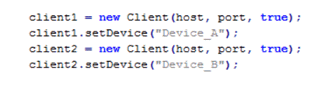
We could have alleviated this problem by temporarily disabling the useSessionID mechanism. To do so, insert the following line in the app.properties file:
useSessionID=false
Variation 4: Runs - This is the recommended approach for adapting your tests
This example resolves the throwing of the exception encountered by Variation 3. Note the inserted releaseClient command on line 3, below, which releases the agent before setting Device_B.
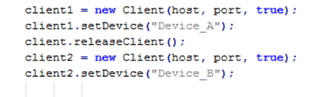
In general, you can use any of the commands cited above (see Commands Which Release the Agent) as appropriate to accomplish this. Again, this is the recommended approach for adapting your existing tests for execution in version 7.8 of Silk Mobile.